Microsoft Dynamics 365 Business Central
Following the October 2025 judgement against GetAddress.io, Ideal Postcodes and Microsoft have co-authored a drop-in replacement for the GetAddress.io Dynamics 365 Business Central extension. The app is complete and awaiting final review and publishing.
The GetAddress.io extension will be removed once the Ideal Postcodes extension becomes available.
Interim Solution
While the dedicated Ideal Postcodes extension is awaiting final approval, you can restore address lookup functionality by reconfiguring the existing GetAddress extension to use the Ideal Postcodes API.
- Create an account on Ideal Postcodes and create an API Key
- In Business Central, use Search to find Postcode Configuration and select the related link
- In the Address Provider field, select GetAddress.io Config
- Update the API Key field to your Ideal Postcodes API Key
- In the Endpoint URL field, enter:
https://ga.ideal-postcodes.co.uk/autocomplete/and save
The Endpoint URL must be copied exactly as shown, including the trailing slash (/). The integration will not work if the trailing slash is missing.
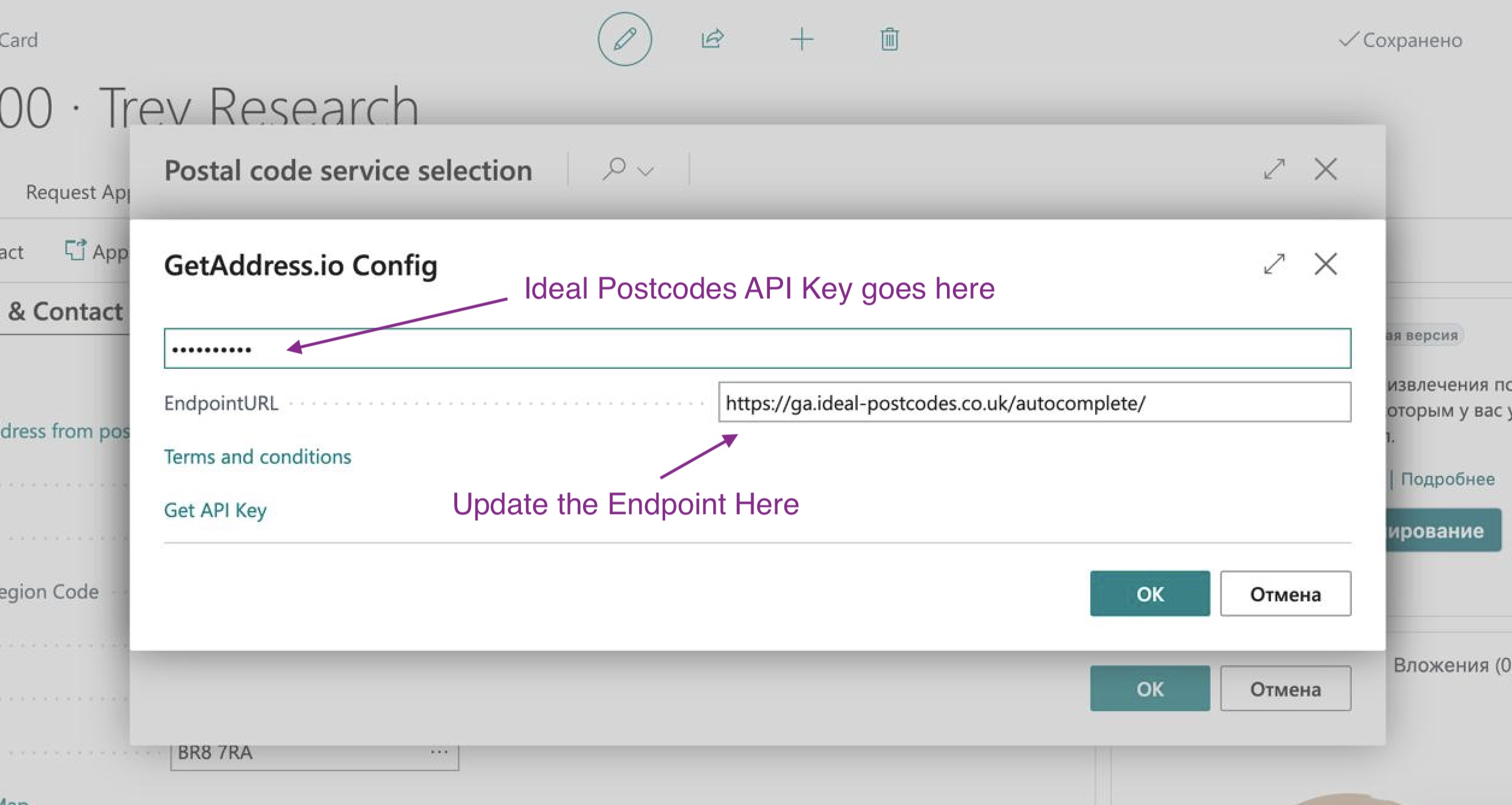
This interim solution provides full address lookup functionality using Ideal Postcodes data while the native extension completes the Microsoft review process.
On-Premise Users with Older Extensions
If you are running an on-premise instance of Business Central with an older version of the GetAddress extension, the autocomplete endpoint may not be supported. In this case, use the find endpoint instead:
- In the Endpoint URL field, enter:
https://ga.ideal-postcodes.co.uk/find/and save
Microsoft Dynamics NAV 2018
If you are running Microsoft Dynamics NAV 2018 with the GetAddress extension, navigate to the GetAddress.io Config panel and update the following fields:
- Update the API Key field to your Ideal Postcodes API Key
- In the Endpoint URL field, enter:
https://ga.ideal-postcodes.co.uk/v2/uk/and save
Need Help?
To be notified when the extension is available, or if you need migration assistance, contact us on chat or email at support@ideal-postcodes.co.uk.