# Jotform Migration
This guide provides step-by-step instructions for migrating your Jotform address validation integration from GetAddress to Ideal Postcodes.
## Migration Overview[](#migration-overview "Direct link to Migration Overview")
Migrating your Jotform integration involves:
1. Removing the GetAddress script reference
2. Adding the Ideal Postcodes Address Finder script
3. Updating the initialization code with correct field mappings
4. Replacing your API key
## Side-by-Side Comparison[](#side-by-side-comparison "Direct link to Side-by-Side Comparison")
### GetAddress Implementation[](#getaddress-implementation "Direct link to GetAddress Implementation")
```
```
### Ideal Postcodes Implementation[](#ideal-postcodes-implementation "Direct link to Ideal Postcodes Implementation")
```
```
## Key Differences[](#key-differences "Direct link to Key Differences")
| Aspect | GetAddress | Ideal Postcodes |
| ------------------- | ------------------------------------------------------- | ----------------------------------------------- |
| **Script Source** | `cdn.getaddress.io` | `cdn.jsdelivr.net` (global CDN) |
| **Function Name** | `getAddress.autocomplete()` | `IdealPostcodes.AddressFinder.watch()` |
| **Field Mapping** | Uses Jotform's compound address field IDs | Uses individual Short Text field IDs |
| **Address Fields** | formatted\_address\_1, town\_or\_city, county, postcode | line\_1, line\_2, line\_3, post\_town, postcode |
| **Selector Format** | Direct field ID | CSS selector (`#input_X`) |
## Migration Steps[](#migration-steps "Direct link to Migration Steps")
### Step 1: Update Your Form Structure[](#step-1-update-your-form-structure "Direct link to Step 1: Update Your Form Structure")
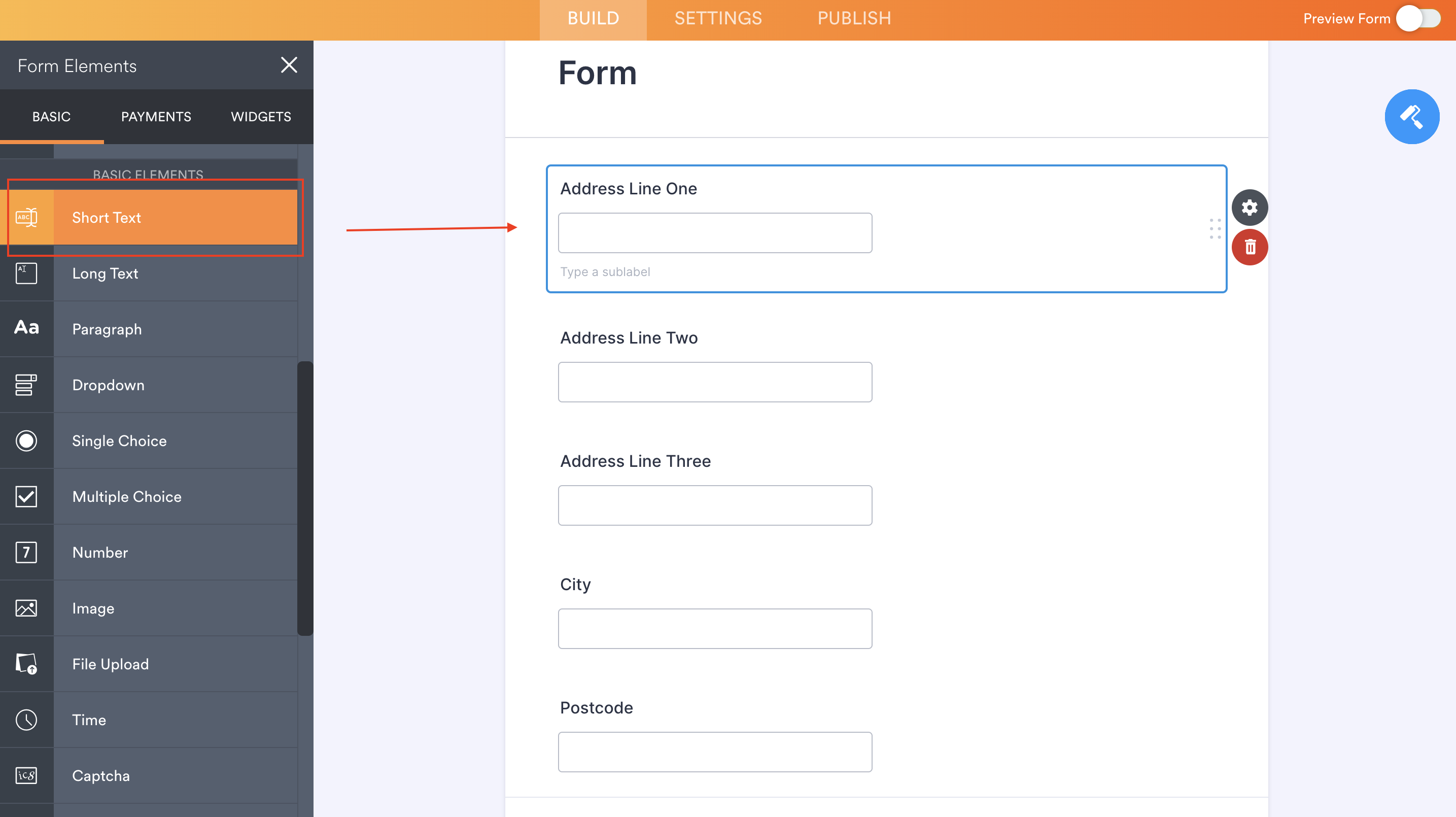
If you're using Jotform's built-in Address element, you'll need to switch to individual Short Text fields for better control and PAF compliance.
**Create these Short Text fields:**
1. Address Line One
2. Address Line Two
3. Address Line Three
4. Post Town
5. Postcode
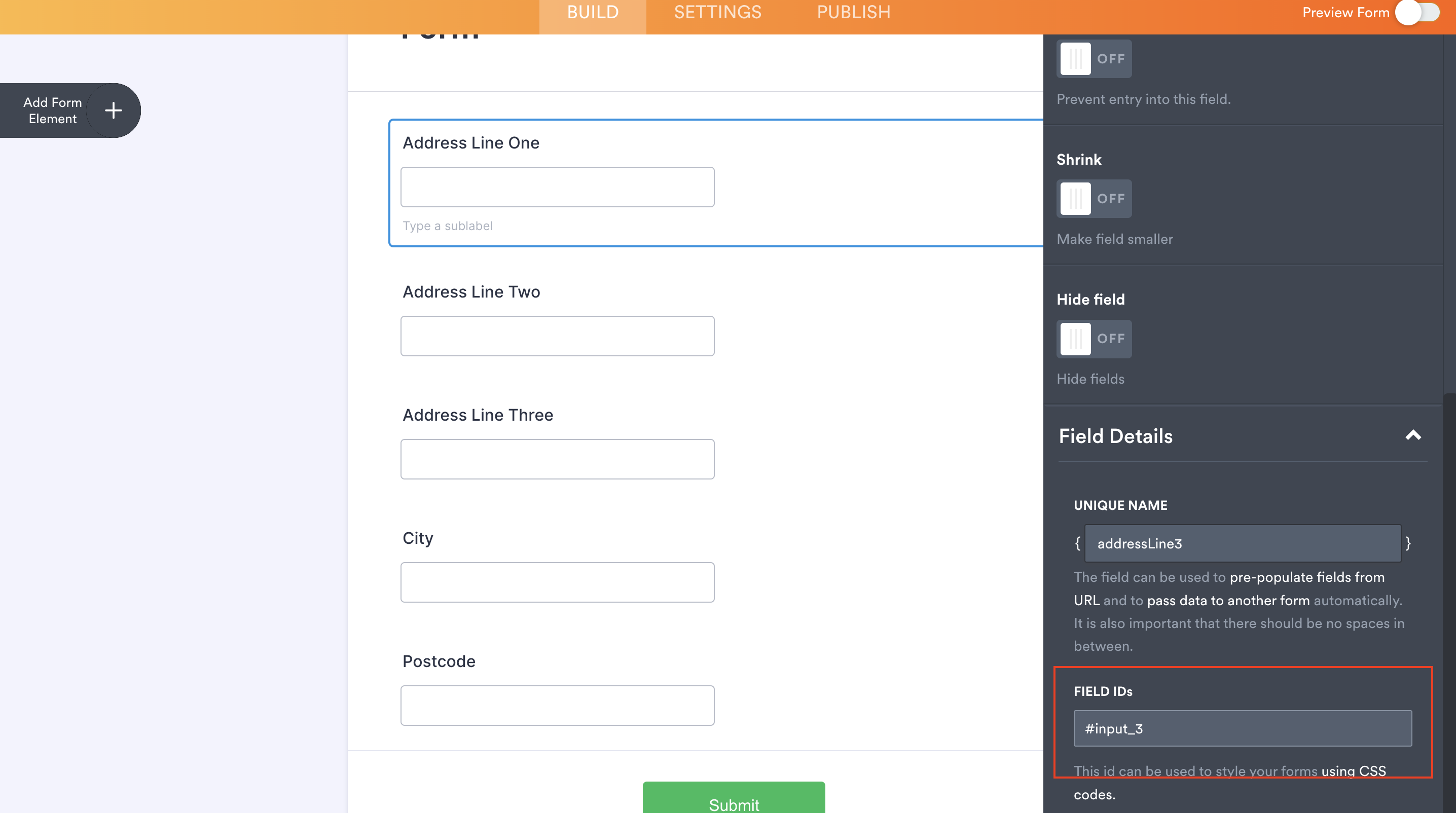
**Note the Field ID** for each field in the `Short Text Properties` panel (e.g., `input_3`, `input_4`, etc.).
### Step 2: Remove GetAddress Script[](#step-2-remove-getaddress-script "Direct link to Step 2: Remove GetAddress Script")
Locate and delete the HTML block containing the GetAddress script:
```
```
### Step 3: Add Ideal Postcodes Script[](#step-3-add-ideal-postcodes-script "Direct link to Step 3: Add Ideal Postcodes Script")
Add a new HTML block with the Ideal Postcodes Address Finder:
```
```
### Step 4: Update Field Mappings[](#step-4-update-field-mappings "Direct link to Step 4: Update Field Mappings")
Replace the Field IDs in `outputFields` with your actual Field IDs:
**Example mapping:**
| Field Name | GetAddress | Ideal Postcodes | Your Field ID |
| -------------- | --------------------- | --------------- | ------------- |
| Address Line 1 | `formatted_address_1` | `line_1` | `#input_3` |
| Address Line 2 | N/A | `line_2` | `#input_4` |
| Address Line 3 | N/A | `line_3` | `#input_5` |
| Town/City | `town_or_city` | `post_town` | `#input_6` |
| Postcode | `postcode` | `postcode` | `#input_7` |
Adding County
If you need a county field, add it to the configuration:
```
outputFields: {
line_1: "#input_3",
line_2: "#input_4",
line_3: "#input_5",
post_town: "#input_6",
county: "#input_8", // Add county field
postcode: "#input_7",
}
```
### Step 5: Replace Your API Key[](#step-5-replace-your-api-key "Direct link to Step 5: Replace Your API Key")
1. [Create an Ideal Postcodes account](https://ideal-postcodes.co.uk/signup) (free test account available)
2. Copy your API key from the dashboard
3. Replace `"ak_test"` in the `apiKey` field with your live API key
```
apiKey: "ak_live_YourActualAPIKey", // Replace this
```
### Step 6: Test Your Form[](#step-6-test-your-form "Direct link to Step 6: Test Your Form")
1. **Preview your form** in Jotform
2. **Start typing an address** in the first address line field
3. **Verify** that address suggestions appear
4. **Select an address** and confirm all fields populate correctly
## Additional Configuration Options[](#additional-configuration-options "Direct link to Additional Configuration Options")
Ideal Postcodes Address Finder supports extensive customization. Common options include:
```
IdealPostcodes.AddressFinder.watch({
apiKey: "ak_live_YourKey",
outputFields: {
/* ... */
},
// Optional configuration
injectStyle: true, // Apply default styling
checkKey: true, // Validate API key on load
placeholder: "Search address", // Custom placeholder text
// Callbacks
onAddressRetrieved: function (address) {
console.log("Address selected:", address);
},
});
```
For complete configuration options, see the [Address Finder Plugin Documentation](/docs/address-finder.md).
## Need Help?[](#need-help "Direct link to Need Help?")
Our support team is available to assist with your migration:
* **Live Chat:** Available on [ideal-postcodes.co.uk](https://ideal-postcodes.co.uk)
* **Email:**
* **Documentation:** [Full Jotform Integration Guide](/docs/integrations/jotform.md)
## Related Documentation[](#related-documentation "Direct link to Related Documentation")
* [Address Finder Plugin Documentation](/docs/address-finder.md) - Complete configuration reference
* [Postcode Lookup Plugin](/docs/postcode-lookup.md) - Alternative lookup-based integration
* [PAF Data Documentation](/docs/data/paf.md) - Understanding UK address data